Miscounts during Register Open or Register Close can be adjusted ONLY AFTER FINAL CLOSE is complete.
Make sure to record the amount of the miscount as soon as it's noticed so the closing manager can make the correct adjustment.
After final close the familiar Accounting Admin screen will come up:
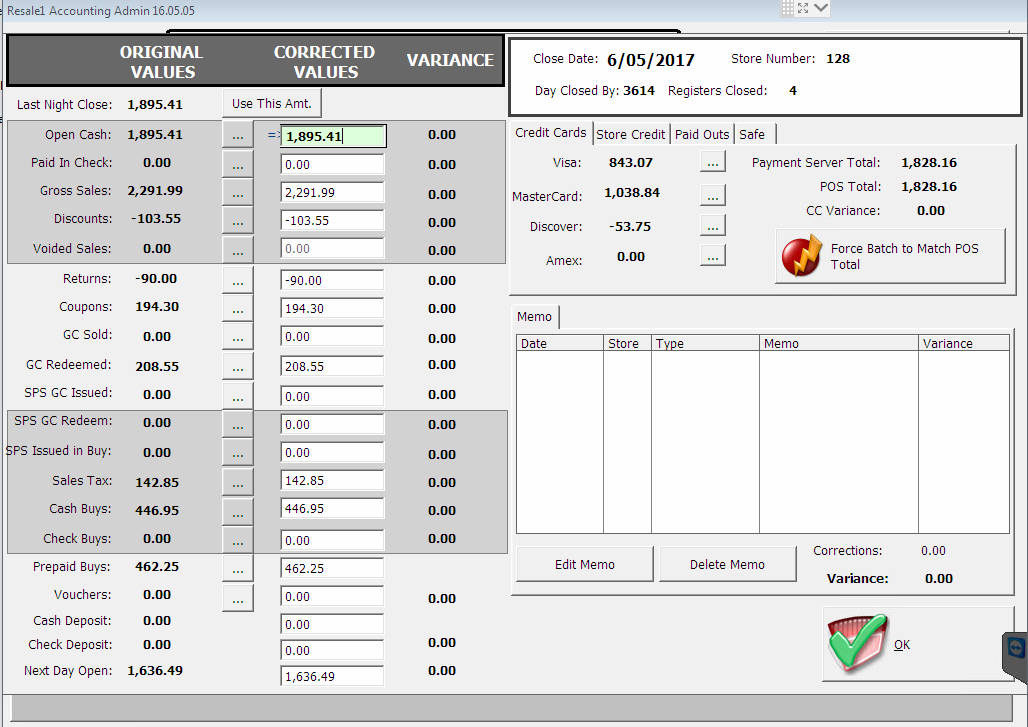

(This screen can be accessed at any time by clicking the Acct. Admin button on the taskbar or desktop )
The Open Cash amount at the top can be adjusted to correct Register Open miscounts.
The Next Day Open amount at the bottom can be adjusted to correct Register Close miscounts.
Both of these fields are the total of all register counts, so adjustments to all registers are made in the same way.
After entering the correct total press the TAB key on your keyboard and you will be prompted to enter a memo about the adjustment. Be sure to enter a brief and accurate description of the issue, such as "Miscount $20 Register 1 open" or "Accidentally didn't count Register 2 when closing".
To remove an adjustment, highlight the memo on the right side and click "Delete Memo".
Support Request Severity: Normal
0 Comments